0007: EKS Cluster and Datahub provisioning
STATUS
Accepted
CONTEXT
- The data team has been exploring tools / products that would the enable teams across our business to explore, understand and derive data insights with minimal technical guidance from the data team
- Two notable open-source tools have been identified Datahub (ready to adopt) and Metabase (under evaluation)
- The TIGR and DevOps team would collaborate to provision the EKS clusters following recommended best practices for efficient day 2 ops
- This ADR is to document all decisions (related to EKS and Datahub) that are discussed and agreed upon by both teams and the VP of Engineering.
Considered Options
- Data Cataloguing Tools
- Acryl, a managed cloud version of datahub
- Alation, an enterprise cataloguing tool
- Offerings within Tableau and Sigma
- k8s
- EKS
- CI/CD
- Github Actions
- ArgoCD
- Codepipeline
DECISION
OSS vs Managed Datahub
- Datahub OSS deployment recommends using Kubernetes in production.
- Datahub also offers a managed service called Acryl, which was considered to avoid the burden of managing Kubernetes clusters. Acryl is priced at $60,000 per year for up to 20 monthly active users.
- Proposal: Utilize the OSS version and self-manage via EKS on AA's AWS
- From a cost perspective, it would be more efficient to deploy and manage Datahub on AA's AWS.
- Since our tech team would manage these clusters, we could use them for:
- Deploying other OSS tools that require Kubernetes, such as Metabase and Airbyte.
- Supporting other scalability objectives we may have for our tech products or internal tools.
Centralized vs Decentralized Clusters
After extensive discussions, we opted for a hybrid approach. We created a new account within the production OU and provisioned all resources in that account. This strategy aims to isolate all resources into a single account while allowing flexibility to adopt either a centralized or decentralized approach as our requirements evolve. A centralized approach would have complicated our CDK project, whereas a decentralized approach would have restricted our clusters to the data team. The original research is preserved in Appendix D for future reference.
The architecture diagram is specified on this miro.
EKS Pods Identities vs IAM roles for Service Accounts
We chose IAM roles for Service Accounts because our team is more familiar with this option compared to EKS Pod Identities. Additionally, we use RBAC for Kubernetes, assigning Permission Sets provisioned through code with privileges on the Kubernetes clusters to perform operations via CLI for any debugging or maintenance activities.
Managed Services for Datahub
- Datahub recommends using AWS managed services for storage services (MySQL, Elasticsearch and Kafka) that are required for operating Datahub.
- We're currently utilizing RDS running a mysql database, use of Elasticsearch Service, Managed Kafka is deferred until our adoption grows and k8s cost increase due to need for increased capacity which would be made evident with degradation of datahub performance.
Managing Access to Datahub
We recommend managing access to Datahub through an Identity Provider (IDP), with Google being the optimal choice for our organization since it allows access to all members. We set up Single Sign-On (SSO) using OpenID Connect and disabled authentication via username and password.
Github Repository Structure
We have implemented a monorepo strategy where the cluster, supporting services, and workloads to be deployed are all contained within a single GitHub repository, managed through distinct CDK stacks. However, as our adoption scales and we transition to a centralized EKS cluster model, we may consider the approach detailed in Appendix C.
Pipeline Setup
We evaluated two methods for setting up the CI/CD pipeline and chose to adopt GitHub Actions. This decision was driven by the complexity of each option relative to our Kubernetes adoption scope. After thorough discussion and debate, we concluded that we only require a pipeline to deploy CDK code for provisioning EKS clusters and deploying workloads using prepackaged Helm Charts. The simplest solution was to use GitHub Actions to deploy code via cdk deploy. If we later decide to deploy custom applications on Kubernetes, ArgoCD would be the preferred best practice.
We've left the original research put together in Appendix A if needed for future reference.
CONSEQUENCES
- Data team can begin to utilize the data cataloguing tool
- AA's tech teams would have EKS clusters available as a service to utilize for scalability needs. We've already identified Airbyte as a potential.
- Increased workload for the DevOps team, since k8s is being newly adopted at AA, our team would have to up-skill for day-1 and day-2 ops.
Risks
- Datahub adoption success relies on following best practices outlined for DBT, Airflow. It also demands increased documentation which increases the overload on the team. We believe this investment would reduce overall cycle times for the data team. See Appendix B for Datahub Best Practices for adoption success.
- This would be the first EKS cluster provisioned and managed by our tech team which implies we have a learning curve to go through.
- Good test coverage for our CDK code and robust pipelines would greatly aid the process.
- A steady approach where development/maintenance goes hand-in-hand with research would greatly aid the process.
NOTES
References
- Multi Account Strategy
- Granting AWS Identity and Access Management permissions to workloads on Amazon Elastic Kubernetes Service clusters
- AWS setup guide, Datahub
- Configure OIDC Authentication on Datahub
- Deploy Helm Chart to EKS Cluster Using CI/CD Pipeline with GitHub Actions
- GitOps: CI/CD Automation Workflow Using GitHub Actions, ArgoCD, and Helm Charts
- ArgoCD Documentation
- PR #19: docs: ADR-0007 EKS and Datahub provisioning
- PR #33: fix: move the eks adr
- PR #127: docs: backfill PR reference links for existing ADRs
- PR #182: docs(adr): normalize STATUS sections to valid template values
Original Author
Nishanth Kaladharan nkaladharan@adaction.com
Fabian Leon fleon@adaction.com
Approval date
Approved by
Appendices
Appendix A - CI/CD Options
1. Imperative Approach Using GitHub Actions and Helm
In this approach, the CI/CD pipeline is defined explicitly through automation scripts, and each step is executed in a controlled manner.
Direct Management
The deployment process for Helm charts is managed directly within the CI/CD pipeline. GitHub Actions workflows handle the entire process, from building Docker images to deploying them on the EKS cluster.
Customization and Control
Each deployment action is explicitly specified. This includes choosing specific Helm chart versions, setting environment-specific parameters, and manually triggering deployments as needed.
Reactive Process
Deployments are triggered based on changes detected in the codebase or configuration files.
Pros:
- Compatibility: This approach can be more straightforward to integrate with existing tools and processes.
- Fine-grained Control: Detailed customization of each deployment step allows for precise control.
- Immediate Feedback: Provides quick feedback on changes, allowing for rapid iteration.
Cons:
- Maintenance Overhead: Requires frequent updates and management of CI/CD scripts and configurations.
- Complexity: Each change or addition requires manual updates to the workflow, increasing the risk of errors.
- Security Concerns: This approach often requires the production api-server endpoint to be publicly accessible, which is not recommended due to security risks. Exposing the cluster to the internet can lead to potential vulnerabilities. Additionally, to allow GitHub Actions to access the cluster, the API server must be public or reachable from GitHub.
2. Declarative Approach Using GitOps with ArgoCD
This approach utilizes GitOps principles, where the desired state of the system, including Helm charts, is stored in a Git repository. ArgoCD automates the synchronization of the cluster with this desired state.
Using ArgoCD Involves:
- Desired State Model: The system's desired state, including all Kubernetes resources and Helm chart configurations, is declaratively defined in the Git repository. This model specifies what the system should look like at any given time.
- Continuous Synchronization: ArgoCD continuously monitors the Git repository. When changes are detected, it automatically synchronizes the EKS cluster to match the desired state, ensuring that the deployed state aligns with the specified configuration.
- Pull-based Automation: Rather than manually triggering deployments, ArgoCD automatically pulls changes from the Git repository and applies them, reducing the need for manual oversight and intervention.
Pros:
- Automation and Consistency: Ensures the cluster state is consistently aligned with the declared state in the Git repository, reducing manual intervention.
- Reduced Operational Overhead: Automates much of the deployment and management process, reducing the need for manual updates.
- Rollbacks: Easier to implement, as reverting to a previous state can be as simple as reverting a commit in the Git repository.
- Enhanced Security: This approach does not require the cluster to be exposed to the internet, as all changes are pulled from a secure, internal Git repository, minimizing potential attack surfaces.
Cons:
- Initial Setup Complexity: Setting up ArgoCD and configuring GitOps workflows can be complex and require a deeper understanding of Kubernetes and GitOps principles.
- Learning Curve: We will need to invest time in learning how to effectively use ArgoCD and GitOps practices.
Appendix B - Datahub Best Practices and Adoption Strategies
Adoption Strategies
- Identifying Business Users / Stakeholder that give feedback
- Documentation initiatives die when a value add is not evident.
- The datahub team recommends that we identify stakeholders / domains within a certain impact radius and get feedback from them as we add meta data to our data products.
- Not only does this drive better adoption, it would also enable us to identify current challenges that stakeholders face and address with the platform with documentation rather than trying to add documentation for everything.
- Identifying Domains and Classifying Datasets:
- Similar to above identify domains that would benefit from adoption of datahub.
- Classify assets that belong to that domain and get feedback from teams that work in that domain.
- A blog on Governance that one of the Acryl Engineers wrote Data Governance, but Make It a Team Sport
Ingestions Automations
- Out-of-Box: Datahub's DBT connector is mature and automatically picks up these meta mappings out of the box from the yaml files. We should utilize a linter to mandate the meta information we need from DBT.
- Custom Automations: Another great tool is utilizing transformers, a great use case for transformers could be marking a dataset with a status that denotes if the dataset is active or is being deprecated. Any additional meta information we need to add to
Meta Data Automations
- Datahub Actions Framework this is for automations on meta data post ingestion. Let's say we want notifications when a dataset's changes a column or the status or owner
- We can develop new custom Actions via Python
- This set of automations is primarily driven by our business processes and the opportunities we see to optimize it.
Appendix C - Github Repository structure for centralized EKS Cluster
-
AdAction/central-eks: Used to version control CDK code that provisions the cluster VPC and RAM sharing, its subnets, the EKS cluster and its worker nodes (EC2 resources) in the cluster account.
-
AdAction/datahub: Used to version control CDK code that provisions datahub on the EKS cluster and the managed services needed to run EKS such as RDS.
-
AdAction/<workload/application>: A custom application that runs on the cluster as a Pod should go into it's own github repository.
Appendix D - Centralized vs Decentralized Clusters and Network Configuration options
Centralized vs Decentralized
-
Centralized
- The primary benefit here is cost and simplicity, This shared cluster account would utilized by the data team as well as other workloads that may be needed for Cosmic or AdGem.
- In this approach, we would create a new
Cluster Accountwhich will contain the cluster VPC, its subnets, the EKS cluster and its worker nodes (EC2 resources). - The resources necessary for running a specific workload (for instance RDS and ElasticSearch for Datahub) would be deployed in the respective team / products workload accounts.
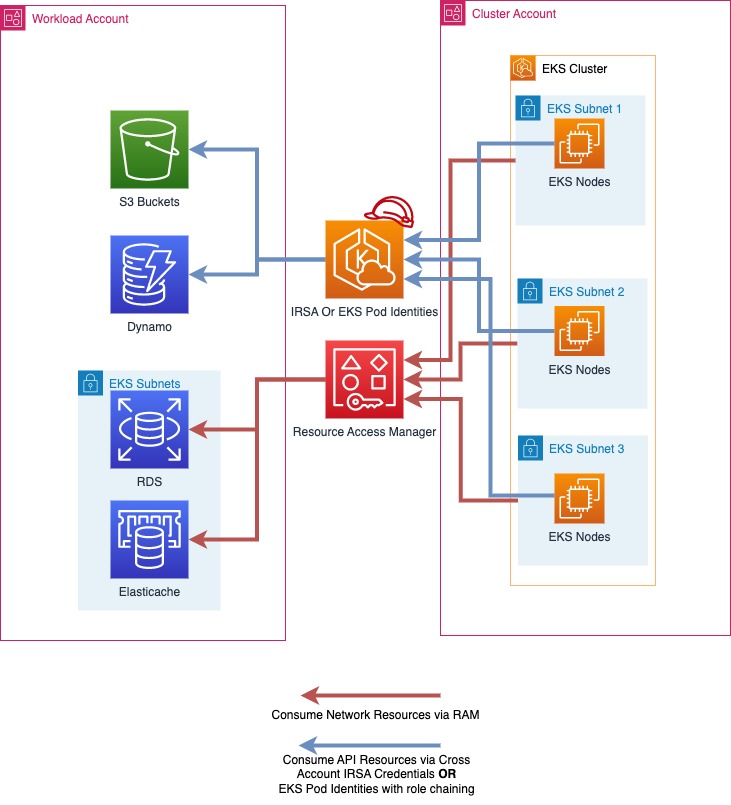 Source: Centralized EKS Cluster, Multi Account Strategy, EKS Best Practices Guides
-
De-Centralized
- In this approach we'd be deploying eks clusters to respective workload accounts. In our context, this would mean that we deploy the eks clusters to the
data-engineering-prodworkload account.
- In this approach we'd be deploying eks clusters to respective workload accounts. In our context, this would mean that we deploy the eks clusters to the
-
Proposal: Spinning up clusters in different workload accounts would increase costs. Recommending a centralized cluster approach.
RAM vs Peering Connections
-
Resource Access Manager
- RAM enables sharing VPC subnets from Cluster account to workload accounts. This implies the resources needed for a workload can be deployed in the same vpc as that of the EKS Cluster.
-
Peering Connections
- This approach would be similar to how we manage peering connections for the warehouse ie the Cluster VPC is the peer requestor and the workload VPCs accept requests.
-
Proposal: Utilize RAM, since that seems the simpler, cost effective and recommended option. Peering connections would need to set up for each VPC w/ the cluster VPC in a workload account.